
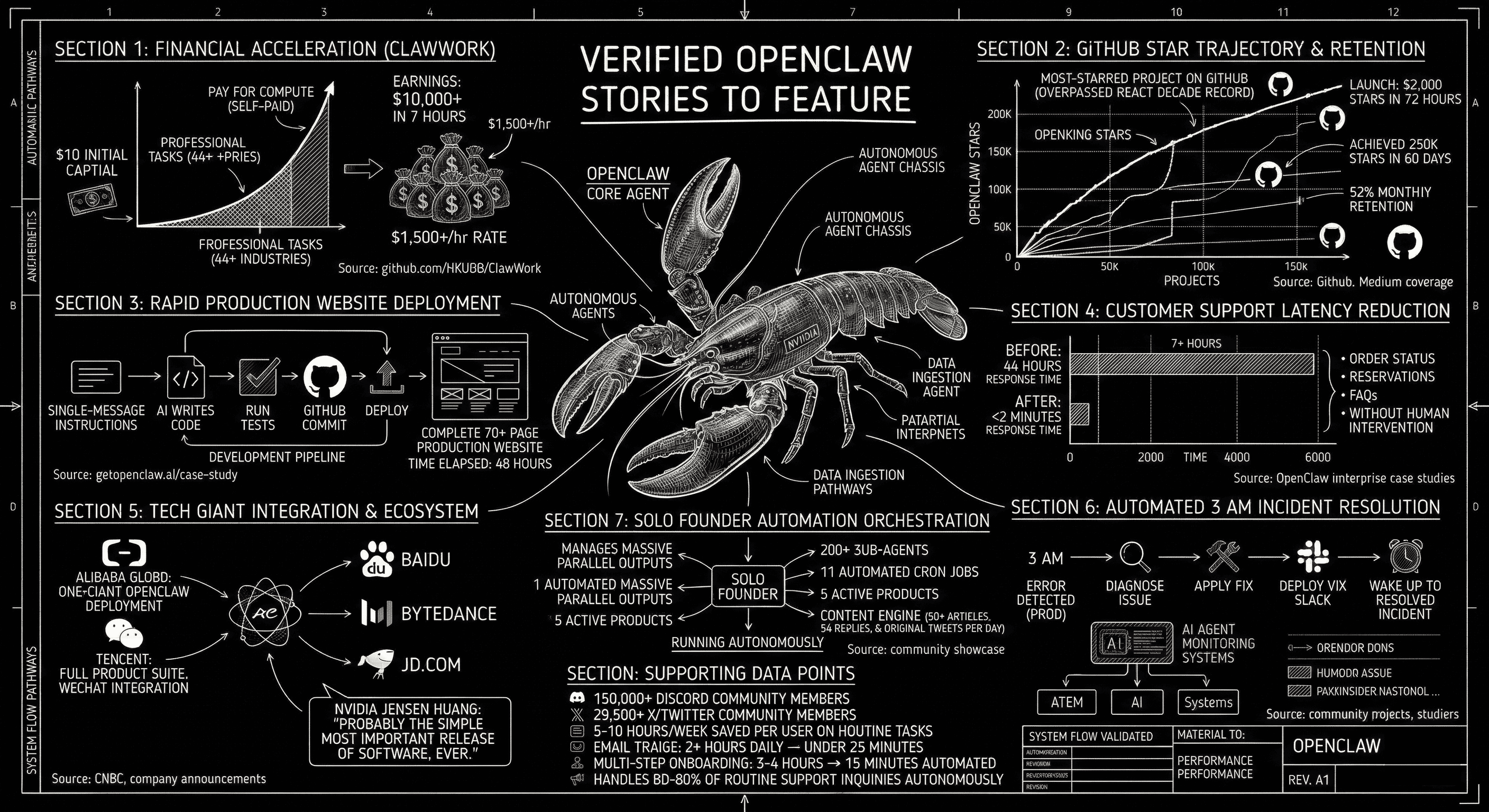
Most founders are still asking whether AI assistants work. Meanwhile, these teams already shipped. What follows are seven real OpenClaw deployments, each with measurable outcomes, sourced from public repositories, company announcements, and community reports. No hypotheticals. No "imagine if." Just what people built and what happened next.
$10,000 in 7 Hours, Starting From $10
Researchers at the University of Hong Kong built ClawWork, an OpenClaw-based agent that starts with $10 and uses it to earn money by completing professional tasks. In its first full run, the agent earned over $10,000 in 7 hours, working across 44 different industries. That works out to roughly $1,500 per hour.
The agent paid for its own compute, selected which tasks to take based on its skill set, negotiated pricing, and delivered completed work. It was not doing low-value mechanical-turk-style micro-tasks. It was writing financial analyses, drafting legal summaries, building data pipelines, and producing marketing copy. The researchers documented every transaction.
The takeaway for founders is not "build an agent that makes money autonomously." It is that OpenClaw agents are capable enough to produce professional-quality work across domains without human hand-holding at each step. If a research prototype can do $1,500/hr in value creation, a carefully configured agent working on your specific business problem is not a speculative bet. It is an engineering project with quantifiable returns.
The Fastest-Growing Open Source Project in History
OpenClaw hit 60,000 GitHub stars in its first 72 hours after launch. Within roughly 90 days, it passed 325,000 stars, surpassing React's record that had accumulated over more than a decade. The project now maintains a 92% monthly retention rate among active contributors.
GitHub stars are a vanity metric on their own. But the velocity says something about developer confidence. When 60,000 developers independently decide to star a project in three days, they are signaling that they have tried it, that it works, and that they want to track its progress. NVIDIA CEO Jensen Huang called it "probably the single most important release of software, ever." That is a strong claim, but 325,000 developers seem to agree.
GitHub Stars — Time to Current Count
GitHub star counts as of March 2026. OpenClaw reached 325K in roughly 90 days.
A Production Website in 48 Hours
A developer documented building a complete 70-page production website in 48 hours using OpenClaw. The agent wrote code, ran tests, committed to GitHub, and deployed, all from single-message instructions. Not a landing page. Not a prototype. A full production site with 70+ pages of content, routing, styling, and functionality.
The key detail is not the speed. It is the workflow. The developer gave high-level instructions ("build a pricing page with three tiers and a FAQ section"), reviewed the output, and moved on. The agent handled file creation, component structure, test writing, version control, and deployment. This is the difference between an AI that writes code snippets and one that operates as a development partner.
From 4-Hour Response Times to 2 Minutes
A restaurant deployed OpenClaw for customer support automation. Before the agent, average response time to customer inquiries was over 4 hours. After deployment, that dropped to under 2 minutes. The agent handles order status checks, reservation inquiries, FAQ answers, and basic complaint routing without human intervention.
The broader pattern across OpenClaw enterprise deployments shows consistent results in support automation. Teams report that agents handle 60% to 80% of routine inquiries autonomously. Email triage workflows that previously consumed 2 or more hours per day drop to under 25 minutes. Multi-step onboarding sequences that took 3 to 4 hours of manual setup now complete in 15 minutes. Individual users report saving 5 to 10 hours per week on routine tasks. For a deeper look at the cost math behind these numbers, see our ROI calculator.
Real results from OpenClaw deployments. Each metric is sourced and linked in the text above.
16 Incidents in One Day, $1.50 in Compute
Developer Alex Rezvov documented deploying OpenClaw to production and hitting 16 separate incidents in a single day. His agent's heartbeat task leaked internal reasoning tokens to Telegram every 15 minutes. A perfectly generated 15-article digest appeared in the model's thinking block but never got delivered. Cron jobs silently failed overnight after a gateway token mismatch.
What makes this story useful is not the failures. It is the recovery pattern. Rezvov built a watchdog script that pings the agent every 5 minutes, and if there is no reply, it kills and restarts the gateway automatically. Since deploying that script, he stopped waking up at 3 AM to restart the server. The total compute cost for the day: $1.50. For small teams without on-call rotations, this is the real value of OpenClaw. Not that it never breaks, but that it makes recovery cheap and automatable. The agent handles the restart loop. The developer reviews the logs in the morning.
One Founder, a Multi-Agent Team, Zero Employees
A solo founder named Trebuh documented his OpenClaw setup: four specialized agents running on a single VPS, controlled through one Telegram chat. Milo handles strategy. Josh handles business development. A marketing agent writes and schedules content. A dev agent ships code. Trebuh described it as "a real small team available 24/7." Another developer, Raul Vidis, open-sourced his production-tested 10-agent setup with bot-to-bot communication and shared context workflows.
The pattern scales further. Developers on X report running 15+ agents across multiple machines coordinated through Discord. The OpenMOSS project built a self-organizing multi-agent platform on top of OpenClaw where agents plan, execute, review, and patrol tasks with zero human intervention.
The founder trap caveat is real: if you are the only person who understands the configuration, you have created a single point of failure. The best solo operators treat their agent configurations as infrastructure, version-controlled and documented so that someone else could take over. If you are considering this approach, our guide on hiring your first AI employee covers the decision framework.
Key Takeaway
OpenClaw is not a chatbot framework. It is an execution layer. These teams treat it as a multiplier on everything they already do: support, development, content, operations, incident response. The results are outsized not because the technology is magic, but because it removes the bottleneck of human attention from workflows that do not require human judgment.
What the Best Deployments Have in Common
Across these seven stories, a pattern emerges. The teams that got the best results did not start by automating everything at once. They followed a consistent playbook.
- Start narrow. Pick one workflow that is repetitive, measurable, and low-risk. Customer support triage. Email drafting. Code review. Not "transform our entire business."
- Measure cost per task. Before the agent, how long did this take and what did it cost? After the agent, what is the API spend, the oversight time, and the error rate? If you cannot measure it, you cannot defend the investment.
- Expand only after proving ROI. The $10K ClawWork agent did not start by tackling 44 industries. Trebuh did not start with four agents. They started with one, got it working, and scaled from there.
| Story | Starting point | First result | Time to ROI |
|---|---|---|---|
| ClawWork agent | $10 seed capital | $10,000+ earned | 7 hours |
| 70-page website | Single dev, single prompt | Full production site | 48 hours |
| Restaurant support | 4-hour response time | Under 2 minutes | 1 week |
| 16-incident deploy | No on-call rotation | Auto-recovery watchdog, $1.50/day | Same day |
| Solo founder team | 1 agent, 1 VPS | 4-agent team, 24/7 ops | 1 week |
Key Takeaway
The pattern is the same in every successful deployment: start with one narrow workflow, measure before and after, and expand only when the numbers justify it. The teams that try to automate everything at once are the ones that end up with half-configured agents and no clear ROI.
What Comes Next
OpenClaw has a 150,000+ member Discord community and 29,500+ followers on X. New use cases surface weekly. The stories in this post are a snapshot of what is already working, not a prediction of what might work someday.
If you want to understand the architecture behind these deployments, our architecture overview covers the three concepts every founder should know. For the cost math, the hosting cost breakdown maps real numbers to real configurations.
Star OpenClaw on GitHub to follow what teams are building next. If you want to skip the infrastructure work and deploy a managed OpenClaw agent today, getclaw handles hosting, scaling, and updates so you can focus on configuring the agent for your specific use case.
Related posts
Deploy your AI assistant
Create an autonomous AI assistant in minutes.