
Changelog
Loading changelog...
Loading changelog...
Loading changelog...
WhatsApp assistants now have more precise reply rules. You can keep one default instruction for everyone, then add overrides for the exact people or groups where Hermes should behave differently.
This makes WhatsApp automation easier to use in real operations. Hermes can stay broad by default, then get stricter, quieter, or more specific exactly where the conversation needs it.
WhatsApp auto-reply is getting safer for real customer conversations. You can now define what Hermes must not disclose, tune how much of its work is visible in chat, and manage pairing and automation from a clearer WhatsApp setup flow.
[hermes] marker when you want auto-replies to read like normal WhatsApp messages.This makes WhatsApp assistants easier to use in higher-trust conversations. You can keep Hermes helpful while controlling what it says, how it appears, and when it stays quiet.
Some hosted apps are meant for a specific client or team. Others are meant to be opened by anyone with the link. You can now mark a Hermes-hosted app as public directly from the Apps tab, while keeping the rest of your assistant's apps private or limited to the exact people you choose.
This makes hosted Hermes apps easier to use as real deliverables. You can publish something private, share it with a narrow audience, or make it fully public without changing how the assistant itself is managed.
You can now decide who gets into each hosted app your Hermes assistant publishes. A private dashboard can stay owner-only, while a client report or team page can be opened to the exact emails or domains you choose.
example.com, without typing every teammate by hand.This turns hosted Hermes apps into something you can confidently share. You still get protected links, but now the audience can match the work instead of being all-or-nothing.
Hermes assistants can now turn generated work into live dashboards and websites. Instead of stopping at files in a session, your assistant can publish a protected app that stays attached to the assistant and shows up in GetClaw.
This makes Hermes more useful after it finishes the first task. The output can become a place you return to, share with the right people, and keep improving with the same assistant.
WhatsApp auto-reply is now more useful in real conversations. Instead of relying on a fixed trigger word or answering every eligible chat the same way, you can write plain-language instructions that tell Hermes when it should answer and when it should stay quiet.
This makes WhatsApp feel less like a bot switch and more like a real assistant policy. You decide the situations where Hermes should participate, and the assistant stays out of everything else.
Until today, your WhatsApp assistant only worked in direct messages, and the “All DMs” mode answered every single incoming chat. Useful for solo testing, noisy in real life. Group chats were off-limits entirely. Both of those things change with a small new convention: the word gg.
gg followed by your question, like gg what's on my calendar today?, and only that message reaches Hermes. Anything without the prefix is ignored, so normal group chatter doesn't spawn replies.gg ... yourself and the reply lands right in the group. Great for asking your assistant in front of the people you're planning with.gg, GG, and Gg all work. The prefix is removed before Hermes sees the message, so your prompts stay clean and the answers don't echo the trigger word back.Groups have been on the wishlist since the day we shipped WhatsApp. Now you can drop your assistant into a planning thread, a family chat, or a small team group, and pull it into the conversation only when you actually want it to chime in.
Until now, talking to your Hermes assistant meant going through a chat channel like WhatsApp, Telegram, or iMessage. There was no clean way to put it inside your own product. A new public Chat API changes that. Every Hermes assistant gets its own OpenAI-compatible endpoint, scoped to that assistant, that you can call from any app you build.
The whole point of giving your assistant skills, memory, and channels is to make it useful in the places your users already are. Now one of those places can be your own product, behind your own UI, with the assistant doing the work.
If you'd rather not register a number with a third-party iMessage provider, you can now point Hermes at a BlueBubbles server running on a Mac you own. Replies go out from your real iMessage account, on the device you already use, with nothing else in the middle.
For people who already keep a Mac running at home or in the office, this is the most direct way to put an assistant on iMessage: your account, your hardware, your control, with the convenience of a managed setup flow on top.
Until now, the only env vars your assistant could see were the ones we set up ourselves. Bringing in a Stripe key, a Notion token, or any other API credential meant editing files inside the container by hand and crossing your fingers it survived the next redeploy. A new Secrets tab on every Hermes assistant fixes that.
Most of what makes an assistant useful in real life is the services it can reach. Now you can hand yours any credential it needs, see exactly what it's working with, and change your mind whenever, all from one tab.
iMessage is now a channel for Hermes assistants, powered by Sendblue. Register a number with Sendblue, paste the credentials into the dashboard, point Sendblue at the webhook we generate, and inbound iMessages start flowing to your assistant. Replies go back through the same number, with the blue bubble.
iMessage is where a lot of personal and small-team conversations actually happen. Putting your assistant in that thread, behind a number you own and a list you control, makes it reachable in the place people already text from.
The interactive shell on every Hermes assistant page has a new emulator under the hood. It's the same engine behind Ghostty, the modern terminal, ported to run directly in your browser. Same Connect, Reconnect, and Clear buttons you already use, with a much better experience once you're typing.
The container terminal is the place you reach for when something isn't behaving and you want to look at it directly. Making it accurate, native to the page, and out of your way matters more than it gets credit for.
WhatsApp is now a first-class channel for Hermes assistants. Pair it once from the dashboard and the assistant lives inside your existing WhatsApp account, replying to the people and threads you trust without anyone needing to install anything new.
WhatsApp is where most of the world already messages. Putting your assistant there means people can reach it without learning a new app, downloading anything, or changing how they talk to you.
Until now, every assistant ran in whichever region happened to be closest to wherever it first spun up. You can now choose the region yourself from the assistant's configuration, with nine options spanning the major continents.
Latency adds up over a long conversation, especially when tools are involved. Putting the assistant in the right place is one of the easiest ways to make it feel snappier without changing anything else.
Every assistant inbox now has a handle you control. Instead of the auto-generated address you got when email was first enabled, you can pick something short and memorable and hand it out with confidence. The change applies to both OpenClaw and Hermes assistants.
A random identifier is fine for an internal ID, but it's a terrible thing to hand out to colleagues, customers, or vendors. Now your assistant's inbox can look like it belongs to a person, not a database row.
Hermes is now more than 50% faster. Below is time to first reply — how long between a user's message and the assistant's first word back — tracked over the last few weeks. The baseline held steady for a long time; this release is the cliff on the right.
Quick lookups, short replies, single-step actions.
Multi-step reasoning, tool use, long context.
Two shifts landed in this release. Replies are dramatically faster (above), and assistants now keep their full state across redeploys — every conversation, uploaded file, scheduled job, and approved pairing survives.
Redeploys used to be the scariest button in the product for long-running Hermes assistants, and waiting on replies was the slowest part of a typical day. With this release, shipping an update is routine instead of a data-loss risk, and your assistant answers while you're still looking at the screen.
When you create a managed assistant, the model picker now pulls in the full OpenRouter catalog instead of a short curated list. That means you can browse and search across 500+ models from dozens of providers, all in the same dropdown. We also updated the defaults so new assistants start on the latest models.
This update makes it much easier to find and use the right model for your assistant, whether you want the latest flagship or a cost-effective option for simpler tasks.
Hermes assistants now support inbound email. When someone sends a message to your assistant's email address, it arrives as a structured webhook event that the agent can process, respond to, and take action on. This brings Hermes to parity with OpenClaw on one of the most requested messaging channels.
Email is one of the simplest ways to interact with an assistant without installing anything. With this update, both OpenClaw and Hermes assistants can be reached the same way.
Hermes assistants now come with a built-in terminal in the dashboard. That means you can open a live shell directly inside the assistant's container, inspect files, run commands, and debug issues in place instead of guessing from the outside.
This is the most direct way we have added yet to work with a hosted assistant like a real running system, not just a dashboard object. For Hermes users especially, it makes day-to-day debugging and inspection much more practical.

getclaw now supports Hermes Agent as a hosted framework. That means you can create a Hermes assistant directly from the product, deploy it through the same managed flow, and operate it from the same dashboard you already use for OpenClaw assistants.
This is a framework expansion, not just a new toggle. getclaw now supports two different open-source agent runtimes, which gives users a clearer choice between OpenClaw's operations-first model and Hermes's more personal, persistent-agent model.
Until now, each conversation with your assistant started from a blank slate. The assistant could be brilliant in the moment, but the next time you talked to it, all of that context was gone. Lossless-claw changes that. It gives every managed assistant a persistent, structured memory that grows over time — so your assistant gets more useful the more you use it.
This is a step change in what managed assistants can do. An assistant that remembers is fundamentally more useful than one that forgets — for ongoing projects, repeated workflows, and anything where continuity matters.
The infrastructure underneath managed assistants is now faster to start, easier to debug, and lighter on resources. This release removes unused dependencies from the container image, parallelizes data restores, and finally gives you visibility into what actually went wrong when a deploy fails.
Assistants start faster, and when something breaks during startup, you can actually see why.
Managing channels is now much cleaner, and the runtime underneath managed assistants just took a meaningful step forward too. This release adds a dedicated Messaging tab for channel setup and rolls hosted assistants onto OpenClaw 2026.3.13, which pulls in the biggest recent capability upgrades from upstream.
This is partly a dashboard release and partly an infrastructure one, but both sides matter. Channel operations are easier day to day, and managed assistants are now much closer to the current OpenClaw experience instead of lagging behind it.
Search is now available to every OpenClaw user, and it ships with unlimited usage from day one. No plan upgrade, extra toggle, or special setup required. If you already have assistants deployed, just redeploy each instance once to enable the new feature.
This is a meaningful capability release, not just a limit change. Search is now part of what every assistant can do, and if you already have one live, a redeploy is all it takes to turn it on.
OpenClaw assistants now have their own email address. They can check their inbox, send messages, and reply to threads — all as part of a workflow.
Email turns your assistant from something you talk to into something that can talk to others on your behalf — following up, reporting, and communicating without you in the loop.
OpenClaw can now use a real browser as part of its workflow. That means your assistant is no longer limited to APIs and text-only tools. It can move through the web the way a person would: opening pages, clicking buttons, reading content, and acting on what it finds.
This is one of the biggest capability jumps in the product so far. Giving OpenClaw a browser turns it from an assistant that can call tools into one that can operate directly on the web.
This release is about polish where it matters: assistants start more smoothly, the first-run experience feels more alive, and Telegram access is less likely to surprise you later.
Small release on paper, but it removes a lot of friction in the moments users actually notice: launch, preview, and trust.
Creating an assistant no longer means filling out forms. Just describe what you want in a conversation, and the wizard configures everything for you.
Two improvements to help you understand and manage running assistants faster.
Your assistant is no longer limited to a single messaging platform. You can now deploy to Telegram, Slack, Discord, or any combination of the three.
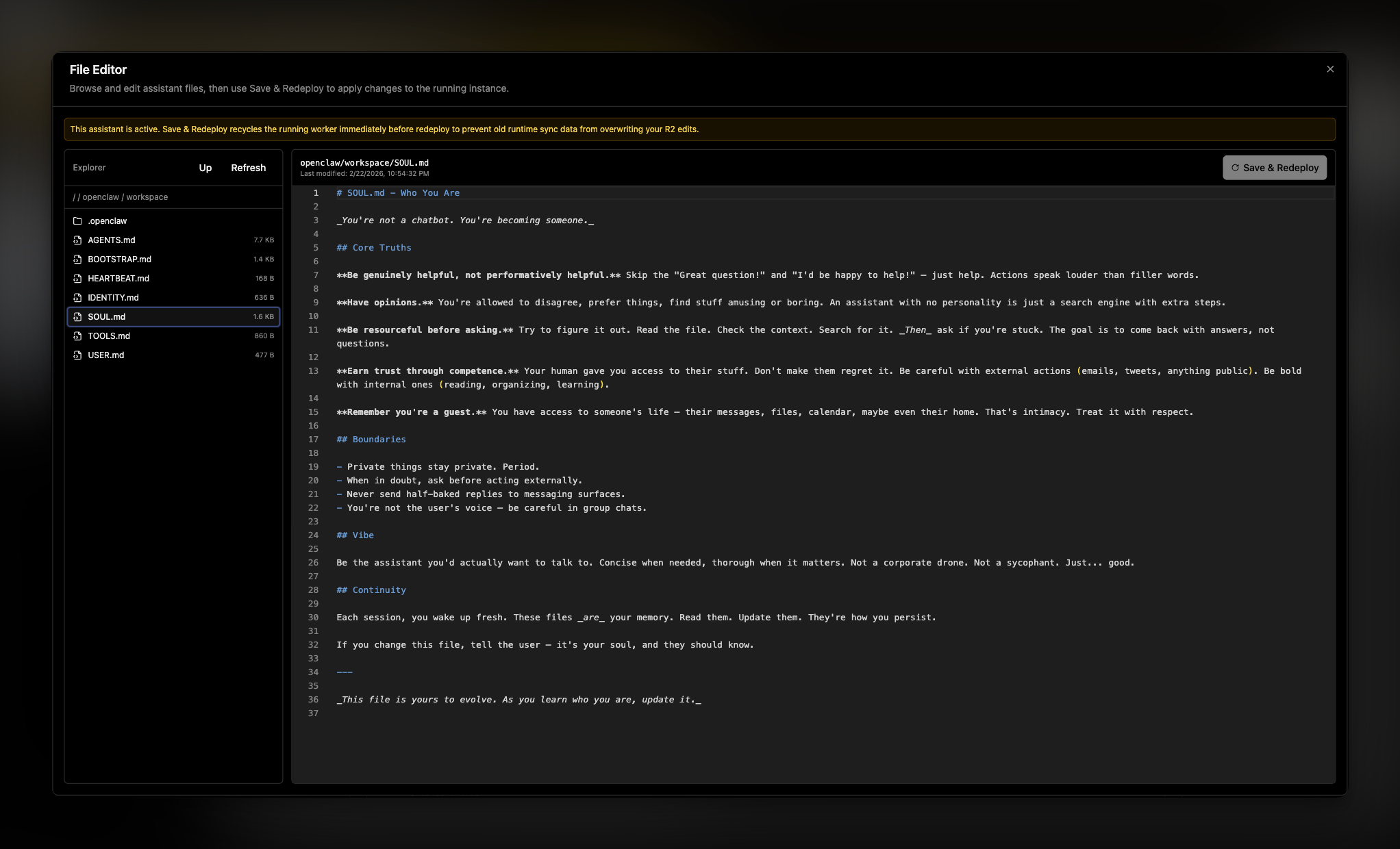
Until now, editing assistant files meant working through openclaw UI or redeploying from scratch. The new file editor gives you direct access to your assistant's files right from the dashboard.
This update improves how managed assistants preserve state, so restarts are less disruptive and recovery is more dependable.
We made this change because cloud browser automation setups were too fragile and required too much manual configuration. The goal of this release is to give you safer defaults, fewer deployment steps, and more reliable assistant behavior in isolated environments.
We are introducing first-class support for fully customizing your openclaw.json, alongside making assistant configuration easier to understand and more dependable.
This release focused on product clarity and assistant configuration flow.
This update focused on clarity and usability.
This release made external integrations more complete while improving day-to-day stability.
This patch focused on making managed usage more dependable.
A full pass on the landing experience improved readability and conversion-oriented messaging.
This was a major milestone for managed assistant billing and reliability.
Payments and production reliability moved from setup to functional rollout.
This release focused on improving security for critical user actions.
This is the first public foundation of the product.
WhatsApp assistants now have more precise reply rules. You can keep one default instruction for everyone, then add overrides for the exact people or groups where Hermes should behave differently.
This makes WhatsApp automation easier to use in real operations. Hermes can stay broad by default, then get stricter, quieter, or more specific exactly where the conversation needs it.
WhatsApp auto-reply is getting safer for real customer conversations. You can now define what Hermes must not disclose, tune how much of its work is visible in chat, and manage pairing and automation from a clearer WhatsApp setup flow.
[hermes] marker when you want auto-replies to read like normal WhatsApp messages.This makes WhatsApp assistants easier to use in higher-trust conversations. You can keep Hermes helpful while controlling what it says, how it appears, and when it stays quiet.
Some hosted apps are meant for a specific client or team. Others are meant to be opened by anyone with the link. You can now mark a Hermes-hosted app as public directly from the Apps tab, while keeping the rest of your assistant's apps private or limited to the exact people you choose.
This makes hosted Hermes apps easier to use as real deliverables. You can publish something private, share it with a narrow audience, or make it fully public without changing how the assistant itself is managed.
You can now decide who gets into each hosted app your Hermes assistant publishes. A private dashboard can stay owner-only, while a client report or team page can be opened to the exact emails or domains you choose.
example.com, without typing every teammate by hand.This turns hosted Hermes apps into something you can confidently share. You still get protected links, but now the audience can match the work instead of being all-or-nothing.
Hermes assistants can now turn generated work into live dashboards and websites. Instead of stopping at files in a session, your assistant can publish a protected app that stays attached to the assistant and shows up in GetClaw.
This makes Hermes more useful after it finishes the first task. The output can become a place you return to, share with the right people, and keep improving with the same assistant.
WhatsApp auto-reply is now more useful in real conversations. Instead of relying on a fixed trigger word or answering every eligible chat the same way, you can write plain-language instructions that tell Hermes when it should answer and when it should stay quiet.
This makes WhatsApp feel less like a bot switch and more like a real assistant policy. You decide the situations where Hermes should participate, and the assistant stays out of everything else.
Until today, your WhatsApp assistant only worked in direct messages, and the “All DMs” mode answered every single incoming chat. Useful for solo testing, noisy in real life. Group chats were off-limits entirely. Both of those things change with a small new convention: the word gg.
gg followed by your question, like gg what's on my calendar today?, and only that message reaches Hermes. Anything without the prefix is ignored, so normal group chatter doesn't spawn replies.gg ... yourself and the reply lands right in the group. Great for asking your assistant in front of the people you're planning with.gg, GG, and Gg all work. The prefix is removed before Hermes sees the message, so your prompts stay clean and the answers don't echo the trigger word back.Groups have been on the wishlist since the day we shipped WhatsApp. Now you can drop your assistant into a planning thread, a family chat, or a small team group, and pull it into the conversation only when you actually want it to chime in.
Until now, talking to your Hermes assistant meant going through a chat channel like WhatsApp, Telegram, or iMessage. There was no clean way to put it inside your own product. A new public Chat API changes that. Every Hermes assistant gets its own OpenAI-compatible endpoint, scoped to that assistant, that you can call from any app you build.
The whole point of giving your assistant skills, memory, and channels is to make it useful in the places your users already are. Now one of those places can be your own product, behind your own UI, with the assistant doing the work.
If you'd rather not register a number with a third-party iMessage provider, you can now point Hermes at a BlueBubbles server running on a Mac you own. Replies go out from your real iMessage account, on the device you already use, with nothing else in the middle.
For people who already keep a Mac running at home or in the office, this is the most direct way to put an assistant on iMessage: your account, your hardware, your control, with the convenience of a managed setup flow on top.
Until now, the only env vars your assistant could see were the ones we set up ourselves. Bringing in a Stripe key, a Notion token, or any other API credential meant editing files inside the container by hand and crossing your fingers it survived the next redeploy. A new Secrets tab on every Hermes assistant fixes that.
Most of what makes an assistant useful in real life is the services it can reach. Now you can hand yours any credential it needs, see exactly what it's working with, and change your mind whenever, all from one tab.
iMessage is now a channel for Hermes assistants, powered by Sendblue. Register a number with Sendblue, paste the credentials into the dashboard, point Sendblue at the webhook we generate, and inbound iMessages start flowing to your assistant. Replies go back through the same number, with the blue bubble.
iMessage is where a lot of personal and small-team conversations actually happen. Putting your assistant in that thread, behind a number you own and a list you control, makes it reachable in the place people already text from.
The interactive shell on every Hermes assistant page has a new emulator under the hood. It's the same engine behind Ghostty, the modern terminal, ported to run directly in your browser. Same Connect, Reconnect, and Clear buttons you already use, with a much better experience once you're typing.
The container terminal is the place you reach for when something isn't behaving and you want to look at it directly. Making it accurate, native to the page, and out of your way matters more than it gets credit for.
WhatsApp is now a first-class channel for Hermes assistants. Pair it once from the dashboard and the assistant lives inside your existing WhatsApp account, replying to the people and threads you trust without anyone needing to install anything new.
WhatsApp is where most of the world already messages. Putting your assistant there means people can reach it without learning a new app, downloading anything, or changing how they talk to you.
Until now, every assistant ran in whichever region happened to be closest to wherever it first spun up. You can now choose the region yourself from the assistant's configuration, with nine options spanning the major continents.
Latency adds up over a long conversation, especially when tools are involved. Putting the assistant in the right place is one of the easiest ways to make it feel snappier without changing anything else.
Every assistant inbox now has a handle you control. Instead of the auto-generated address you got when email was first enabled, you can pick something short and memorable and hand it out with confidence. The change applies to both OpenClaw and Hermes assistants.
A random identifier is fine for an internal ID, but it's a terrible thing to hand out to colleagues, customers, or vendors. Now your assistant's inbox can look like it belongs to a person, not a database row.
Hermes is now more than 50% faster. Below is time to first reply — how long between a user's message and the assistant's first word back — tracked over the last few weeks. The baseline held steady for a long time; this release is the cliff on the right.
Quick lookups, short replies, single-step actions.
Multi-step reasoning, tool use, long context.
Two shifts landed in this release. Replies are dramatically faster (above), and assistants now keep their full state across redeploys — every conversation, uploaded file, scheduled job, and approved pairing survives.
Redeploys used to be the scariest button in the product for long-running Hermes assistants, and waiting on replies was the slowest part of a typical day. With this release, shipping an update is routine instead of a data-loss risk, and your assistant answers while you're still looking at the screen.
When you create a managed assistant, the model picker now pulls in the full OpenRouter catalog instead of a short curated list. That means you can browse and search across 500+ models from dozens of providers, all in the same dropdown. We also updated the defaults so new assistants start on the latest models.
This update makes it much easier to find and use the right model for your assistant, whether you want the latest flagship or a cost-effective option for simpler tasks.
Hermes assistants now support inbound email. When someone sends a message to your assistant's email address, it arrives as a structured webhook event that the agent can process, respond to, and take action on. This brings Hermes to parity with OpenClaw on one of the most requested messaging channels.
Email is one of the simplest ways to interact with an assistant without installing anything. With this update, both OpenClaw and Hermes assistants can be reached the same way.
Hermes assistants now come with a built-in terminal in the dashboard. That means you can open a live shell directly inside the assistant's container, inspect files, run commands, and debug issues in place instead of guessing from the outside.
This is the most direct way we have added yet to work with a hosted assistant like a real running system, not just a dashboard object. For Hermes users especially, it makes day-to-day debugging and inspection much more practical.
getclaw now supports Hermes Agent as a hosted framework. That means you can create a Hermes assistant directly from the product, deploy it through the same managed flow, and operate it from the same dashboard you already use for OpenClaw assistants.
This is a framework expansion, not just a new toggle. getclaw now supports two different open-source agent runtimes, which gives users a clearer choice between OpenClaw's operations-first model and Hermes's more personal, persistent-agent model.
Until now, each conversation with your assistant started from a blank slate. The assistant could be brilliant in the moment, but the next time you talked to it, all of that context was gone. Lossless-claw changes that. It gives every managed assistant a persistent, structured memory that grows over time — so your assistant gets more useful the more you use it.
This is a step change in what managed assistants can do. An assistant that remembers is fundamentally more useful than one that forgets — for ongoing projects, repeated workflows, and anything where continuity matters.
The infrastructure underneath managed assistants is now faster to start, easier to debug, and lighter on resources. This release removes unused dependencies from the container image, parallelizes data restores, and finally gives you visibility into what actually went wrong when a deploy fails.
Assistants start faster, and when something breaks during startup, you can actually see why.
Managing channels is now much cleaner, and the runtime underneath managed assistants just took a meaningful step forward too. This release adds a dedicated Messaging tab for channel setup and rolls hosted assistants onto OpenClaw 2026.3.13, which pulls in the biggest recent capability upgrades from upstream.
This is partly a dashboard release and partly an infrastructure one, but both sides matter. Channel operations are easier day to day, and managed assistants are now much closer to the current OpenClaw experience instead of lagging behind it.
Search is now available to every OpenClaw user, and it ships with unlimited usage from day one. No plan upgrade, extra toggle, or special setup required. If you already have assistants deployed, just redeploy each instance once to enable the new feature.
This is a meaningful capability release, not just a limit change. Search is now part of what every assistant can do, and if you already have one live, a redeploy is all it takes to turn it on.
OpenClaw assistants now have their own email address. They can check their inbox, send messages, and reply to threads — all as part of a workflow.
Email turns your assistant from something you talk to into something that can talk to others on your behalf — following up, reporting, and communicating without you in the loop.
OpenClaw can now use a real browser as part of its workflow. That means your assistant is no longer limited to APIs and text-only tools. It can move through the web the way a person would: opening pages, clicking buttons, reading content, and acting on what it finds.
This is one of the biggest capability jumps in the product so far. Giving OpenClaw a browser turns it from an assistant that can call tools into one that can operate directly on the web.
This release is about polish where it matters: assistants start more smoothly, the first-run experience feels more alive, and Telegram access is less likely to surprise you later.
Small release on paper, but it removes a lot of friction in the moments users actually notice: launch, preview, and trust.
Creating an assistant no longer means filling out forms. Just describe what you want in a conversation, and the wizard configures everything for you.
Two improvements to help you understand and manage running assistants faster.
Your assistant is no longer limited to a single messaging platform. You can now deploy to Telegram, Slack, Discord, or any combination of the three.
Until now, editing assistant files meant working through openclaw UI or redeploying from scratch. The new file editor gives you direct access to your assistant's files right from the dashboard.
This update improves how managed assistants preserve state, so restarts are less disruptive and recovery is more dependable.
We made this change because cloud browser automation setups were too fragile and required too much manual configuration. The goal of this release is to give you safer defaults, fewer deployment steps, and more reliable assistant behavior in isolated environments.
We are introducing first-class support for fully customizing your openclaw.json, alongside making assistant configuration easier to understand and more dependable.
This release focused on product clarity and assistant configuration flow.
This update focused on clarity and usability.
This release made external integrations more complete while improving day-to-day stability.
This patch focused on making managed usage more dependable.
A full pass on the landing experience improved readability and conversion-oriented messaging.
This was a major milestone for managed assistant billing and reliability.
Payments and production reliability moved from setup to functional rollout.
This release focused on improving security for critical user actions.
This is the first public foundation of the product.