
Instantly costs $37 per user per month. Lemlist starts at $69. Apollo charges $49 before you factor in credit overages. For a five-person sales team, that adds up to $2,200 to $4,100 per year on outreach tooling alone. An open-source AI agent running the same workflow costs $10 to $30 per month in model API fees. This guide walks you through building that workflow, step by step, in both OpenClaw and Hermes Agent.
We will follow a concrete example throughout: Priya runs a 12-person B2B SaaS company that sells inventory management software to restaurant chains. She needs to reach operations managers at mid-size restaurant groups (20 to 100 locations). Her team does not have a dedicated SDR. Right now, Priya and her co-founder spend about 8 hours per week researching prospects, writing cold emails, and following up manually. By the end of this guide, you will know exactly how to build what Priya built: an AI outreach skill that handles that research and writing on autopilot, on either platform. If you want to understand how these two frameworks compare at a strategic level first, start with our OpenClaw vs Hermes Agent comparison.
What an Outreach Skill Actually Does
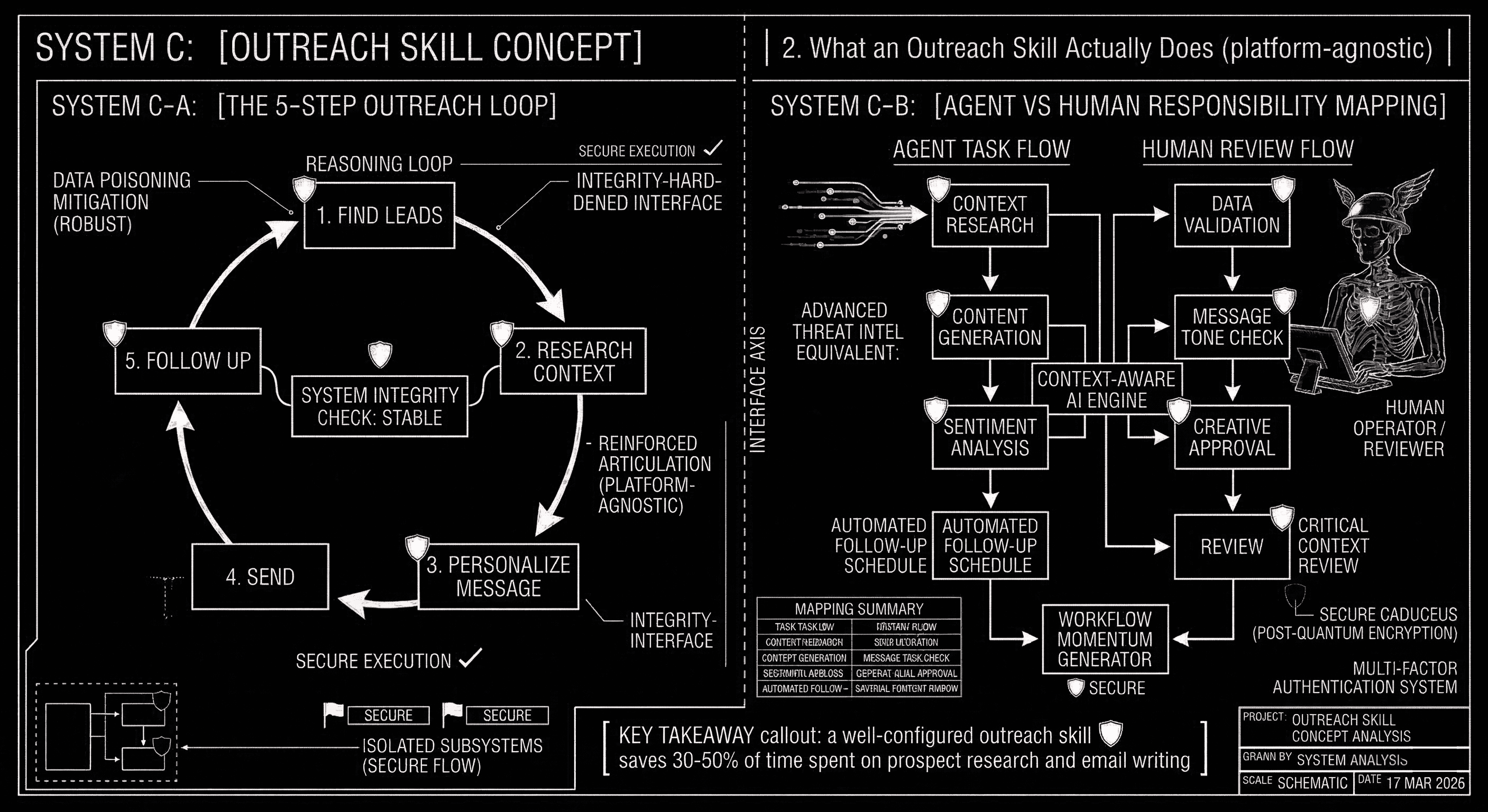
Every outreach automation, whether built on a $100/month SaaS tool or an open-source agent, follows the same five-step loop.
- Find leads. The agent searches LinkedIn, company databases, or your CRM for prospects matching your ideal customer profile. For Priya, that means operations managers at restaurant groups with 20+ locations in the US.
- Research context. For each lead, the agent reads their recent LinkedIn posts, company news, job postings, or press mentions to find a personalization hook. If a restaurant group just announced a new location opening, that is a hook.
- Personalize the message. The agent drafts a tailored email that references something specific about the prospect. Not "Hi [First Name], I noticed your company is growing" but "Hi Maria, congrats on the Austin expansion. Managing inventory across 34 locations is a different game than 20. Here is how we help chains at your stage."
- Send (or queue for review). The agent delivers the message through your email provider or adds it to a review queue for human approval before sending.
- Follow up. If there is no reply within 3 to 5 days, the agent sends a follow-up with a different angle.
The AI agent handles steps 1 through 3 and step 5 autonomously. Step 4 is where you decide how much human oversight to keep. Most founders start by reviewing every draft for the first two weeks, then gradually let the agent send directly once they trust the quality. Sellers using AI outreach tools report cutting research and personalization time by 90%. The agent handles the tedious hours; you keep control over relationships.
The 5-step outreach loop. Steps 1-3 and 5 are agent-handled; step 4 is human review.
Key Takeaway
A well-configured outreach skill saves 30 to 50% of the time your team spends on prospect research and email writing. For Priya, that turned 8 hours per week into 3, freeing 5 hours for demos and closing.
Step 1: Write Your Outreach Skill File
Both OpenClaw and Hermes Agent use the same skill file format: a SKILL.md file with frontmatter at the top and plain-English instructions in the body. You are not writing code. You are writing instructions for the agent the same way you would brief a new hire. The skill file lives in your workspace's skills/ directory (OpenClaw) or gets loaded from the skills registry (Hermes).
Here is the skill file Priya wrote for her restaurant outreach. Every section is something you would adapt to your own business.
workspace/skills/outreach/SKILL.md
name: restaurant-chain-outreach
description: Research and draft personalized cold emails to operations managers at mid-size restaurant chains
requires: [web_search, email_draft, contacts_read]
Ideal Customer Profile
Target operations managers, VP of operations, or directors of supply chain at US restaurant groups with 20 to 100 locations. Focus on chains that serve fast-casual or casual dining. Skip fine dining and single-location restaurants.
How to Research Each Lead
Before drafting any email, look up the following for each prospect: (1) How many locations the chain currently operates. (2) Any recent news: new location openings, funding rounds, leadership changes, or menu expansions. (3) The prospect's recent LinkedIn activity, especially posts about operations challenges, hiring, or growth. (4) Whether they currently use a competitor (MarketMan, BlueCart, Lightspeed Restaurant). Use this research to find one specific detail to reference in the opening line.
Email Guidelines
Keep each email under 120 words. Use a casual, founder-to-operator tone. Never use the phrases "I hope this email finds you well," "just checking in," or "I wanted to reach out." Open with the specific detail from your research. State one concrete result (example: "Our customers cut food waste by 23% in the first quarter"). End with a single low-friction ask: "Worth a 15-minute call this week?" Do not attach files or include more than one link.
Follow-up Rules
If no reply after 4 business days, send one follow-up with a different angle (a case study, a relevant stat, or a question about their current workflow). If no reply after the follow-up, mark the lead as "parked" and do not contact again for 90 days. Never send more than 2 emails to the same person in a sequence.
Boundaries
Do not email anyone who has previously unsubscribed or replied asking to stop. Do not send more than 25 new emails per day. Always queue drafts for human review before sending. Do not scrape personal email addresses; only use work emails found on company websites or LinkedIn profiles.
Notice what this file does not contain: no code, no API configurations, no templates with merge fields. It reads like an onboarding document for a junior SDR. That is the point. The agent treats these instructions as its operating manual and uses its built-in tools (web search, email integration, contact lookups) to execute each step.
You do not need to write yours from scratch either. OpenClaw's community skill registry includes outreach-specific skills (foxreach-io, cold-email, activecampaign) that you can install and customize. Starting from a community skill and adapting the ICP section and email guidelines to your voice takes 1 to 2 hours instead of a full afternoon.
Step 2: See What the Agent Produces
Before we get into scheduling, here is what the agent actually generates from the skill file above. This is the difference between AI-personalized outreach and template-based tools.
Agent-generated email draft (queued for review)
To: Maria Chen, VP Operations at Greenhouse Eats (34 locations)
Subject: Scaling from 20 to 34 locations changes the inventory math
Hi Maria,
Congrats on the Austin and San Antonio openings. Going from 20 to 34 locations in 18 months is serious momentum.
At that scale, most chains find that the inventory processes that worked at 20 locations start breaking. Overordering at new sites, inconsistent pars, food waste creeping up. We help chains at your stage centralize inventory across locations. Our customers typically cut food waste by 23% in the first quarter.
Worth a 15-minute call this week to see if that applies to Greenhouse Eats?
Priya
Compare that to a typical template-based email: "Hi Maria, I noticed your company is growing. We help restaurants with inventory management. Would you like to learn more?" The agent-generated version references the specific expansion (Austin, San Antonio), the exact location count (20 to 34), and the timeline (18 months). That kind of detail is what gets replies. AI-plus-human hybrid outreach shows 38% opportunity conversion compared to 11% for high-volume, low-personalization approaches, generating 2.3x more revenue from fewer emails.
Step 3a: Schedule It in OpenClaw (Heartbeat + Cron)
With your skill file written, the next step is making the outreach run continuously. OpenClaw uses two scheduling mechanisms that work together: heartbeat for cheap, frequent monitoring and cron for precise, time-sensitive sends.
The Heartbeat File
OpenClaw's heartbeat system checks a HEARTBEAT.md file at a configurable interval. You set the interval (every 2 hours during business hours, for example), and each cycle the agent scans the checklist and runs any pending tasks. Here is what Priya's heartbeat file looks like.
workspace/HEARTBEAT.md
Outreach checklist (runs every 2 hours, 8 AM to 6 PM weekdays)
- Check the contacts spreadsheet for any new leads added since the last heartbeat. If there are new leads, run the restaurant-chain-outreach skill for each one and queue the draft emails for my review.
- Check the sent emails folder for any outreach emails older than 4 business days with no reply. For those leads, draft a follow-up using the follow-up rules in the outreach skill and queue it for review.
- Send me a summary on Telegram with: how many new drafts are ready for review, how many follow-ups are queued, and how many replies came in since the last check.
Each heartbeat check with the isolatedSession and lightContext flags uses only 2,000 to 5,000 tokens (the minimum context the agent needs to read the checklist and decide what to do). At typical API pricing, that is under $0.01 per check. Over a month of business-hour heartbeats (roughly 200 checks), continuous outreach monitoring costs $2 to $10 in API fees.
For the actual email sends, add a cron job that runs once per day at 9 AM: "Send all approved drafts from the outreach review queue." This separates monitoring (heartbeat, cheap, frequent) from sending (cron, precise timing, once daily). The result: Priya reviews drafts on her phone via Telegram throughout the day, approves the good ones with a thumbs-up, and the agent sends them all at 9 AM the next morning.
Key Takeaway
OpenClaw's heartbeat system lets you run outreach monitoring every 2 hours for under $0.01 per cycle. A full month of continuous monitoring costs $2 to $10 in API fees, compared to $37 to $99 per seat for commercial tools.
Checks task list every 2 hours. Under $0.01 per cycle.
"Every weekday at 8 AM, check for new leads and draft emails..."
Parsed schedule:
0 8 * * 1-5 — outreach-drafts
0 17 * * 1-5 — follow-ups
Set schedules in plain English. Full session per job.
OpenClaw checks a task list at intervals; Hermes schedules via plain-English chat.
Step 3b: Schedule It in Hermes Agent (Natural Language Cron)
Hermes Agent uses the same SKILL.md file (the two platforms share the agentskills.io standard, so your skill is portable). The scheduling works differently: instead of editing config files, you tell Hermes what to do in a chat message.
Example prompt to Hermes Agent
"Every weekday at 8 AM, check my contacts spreadsheet for new leads, run the restaurant-chain-outreach skill for each one, and save the draft emails to my review folder. Then at 5 PM, check for any outreach emails older than 4 days with no reply and draft follow-ups. Send me a Telegram summary after each run."
Hermes converts this into two cron schedules and persists them. Job results are saved to a local output directory, so you can audit every email the agent drafted and every research step it took.
Parallel Processing with Subagents
Hermes's standout feature for outreach is parallel lead processing. When your outreach skill needs to handle a batch of leads, Hermes can spin up to 3 isolated subagents that work simultaneously. Each subagent independently researches one lead, reads their LinkedIn activity, checks company news, and drafts a personalized email. For a batch of 15 new leads, that cuts processing from 45 minutes (sequential) to about 15 minutes.
Each subagent runs in its own isolated session. If the agent fails to find research for one lead (maybe the person has no public LinkedIn profile), the other leads still get processed. The parent agent collects all results and compiles them into a single review folder.
Self-Improving Skills
After running the outreach skill for a few weeks, Hermes can auto-generate a refined version of your skill document. Say Priya's initial instructions produced emails that averaged 150 words (over her 120-word target), and she kept editing them down. Hermes notices the pattern and updates the skill to say "strict maximum 110 words." If follow-ups that mentioned a specific case study got more replies than ones that asked a question, Hermes adjusts the follow-up rules to favor case-study angles. Over time, the skill converges on your most effective messaging without you manually editing instructions. For a deeper look at how both platforms protect your data during this process, see our security comparison.
Side-by-Side Comparison
Here is how the two platforms compare on the factors that matter most for an outreach workflow.
| Factor | OpenClaw | Hermes Agent | What This Means for You |
|---|---|---|---|
| Scheduling | Heartbeat (interval) + Cron files | Natural language cron via chat | OpenClaw batches checks cheaply; Hermes lets you set schedules in plain English |
| Parallel processing | Sequential by default | Up to 3 parallel subagents | Hermes processes lead batches 3x faster for high-volume outreach |
| Skill ecosystem | 100+ community skills including outreach templates | 40+ tools + auto-generated skills | OpenClaw has more ready-made starting points; Hermes generates its own over time |
| Self-improvement | Manual skill updates | Auto-refines skill docs from results | Hermes learns what messaging works and adjusts; OpenClaw needs you to edit |
| Notifications | Telegram, Slack, Discord, etc. | Telegram, Slack, Discord, etc. | Both deliver summaries wherever your team works |
| Cost per monitoring cycle | Under $0.01 (isolated heartbeat) | Full session per cron job | OpenClaw is cheaper for frequent, lightweight checks |
Which should you pick? If you want the lowest per-cycle cost and access to community-built outreach skills you can install today, start with OpenClaw. If you want parallel lead processing, self-improving skills, and scheduling via chat, start with Hermes Agent. Both use the same skill file standard, so you can switch later without rewriting your instructions.
The ROI Math: Build vs. Buy
Here is what outreach costs across three approaches, for a single user.
| Cost Factor | DIY Agent (OpenClaw or Hermes) | Commercial Tool (Instantly/Lemlist/Apollo) | Hiring a VA |
|---|---|---|---|
| Monthly cost | $10 to $30 (API fees) | $37 to $99 | $500 to $2,000 |
| Annual cost | $120 to $360 | $444 to $1,188 | $6,000 to $24,000 |
| Setup time | 4 to 8 hours (one afternoon) | 1 to 2 hours | 1 to 2 weeks (hiring + training) |
| Ongoing maintenance | 1 to 2 hours/month | Managed by vendor | 5 to 10 hours/month (management) |
| Personalization depth | High (full AI research per lead) | Medium (templates + AI assist) | High (limited by human throughput) |
| Scalability | Scales with API budget | Scales with seat licenses | Scales with headcount |
Priya's math: she was spending 8 hours per week on outreach (research + writing), roughly $1,600/month in founder time at a conservative $50/hour. Her AI agent costs $18/month in API fees and saves her about 5 hours per week. The break-even against commercial tools is roughly 2 months. Against a VA, it is immediate. For a 5-person team over a year, the savings against commercial tools run $1,500 to $4,200. For a detailed look at what hosting an AI agent costs beyond outreach, see our full cost breakdown.
Key Takeaway
An open-source outreach agent costs $120 to $360 per year compared to $444 to $1,188 for commercial tools. Priya saved 5 hours per week and $1,600/month in founder time for $18/month in API fees. The skill paid for itself in the first week.
Five Mistakes That Kill Outreach Automation
The ROI numbers above assume you build the skill correctly. Here is what separates effective AI outreach from the spam-cannon approach that burns your domain reputation and wastes your time.
- Skipping the review queue. Let the agent draft every message for the first 2 weeks. Read every email before it sends. Priya caught three tone mismatches in the first week (the agent was too formal for her brand). Two weeks of review built her trust and improved the skill instructions.
- Prioritizing volume over quality. 25 personalized emails per day beats 200 generic ones. AI-only outreach pipelines that maximize volume show 11% opportunity conversion. AI-plus-human hybrid approaches hit 38% conversion and generate 2.3x more revenue from fewer emails. Your skill file should cap daily sends explicitly.
- Weak personalization hooks. "I noticed your company is growing" is not personalization. Your skill instructions need to tell the agent exactly what to look for: a recent LinkedIn post, a funding round, a new location opening, a job posting for an ops role. The specificity of your instructions determines the specificity of the output.
- Ignoring opt-outs. Add a line to your skill: "Before drafting any email, check the unsubscribe list. Do not contact anyone on it." One compliance failure costs more than a year of outreach tooling in fines and reputation damage.
- Measuring send rate instead of reply rate. A 5% reply rate on 25 daily emails (1.25 replies per day) is worth more than a 0.5% reply rate on 200 emails (1 reply per day, plus 10x the domain risk). Track replies per week, not emails sent.
Your Next Step
Here is the exact sequence to go from zero to a running outreach skill in an afternoon.
- Write your SKILL.md using the template above. Replace Priya's ICP, research instructions, and email guidelines with your own. Spend the most time on the "How to Research Each Lead" section, because the quality of the research determines the quality of every email.
- Choose your platform. Install OpenClaw if you want heartbeat scheduling and community skill templates. Install Hermes Agent if you want natural language scheduling and parallel lead processing.
- Set up your schedule. In OpenClaw, write a HEARTBEAT.md with your outreach checklist. In Hermes, send a chat message describing your schedule.
- Start in review mode. Let the agent draft for 2 weeks before enabling auto-send. Use this time to refine your skill instructions based on what the agent produces.
- Graduate to autopilot. Once the drafts consistently match your voice and quality bar, enable auto-send with a daily cap of 20 to 30 emails.
Both frameworks are free, open source, and can be running in under an hour. The outreach skill you build on top will pay for itself within a week of saved research time.
Related posts
Deploy a Hermes Agent for free
Start a 3-day free trial and launch a Hermes Agent on getclaw in minutes.